





















































How to File Your SARS Tax Return (ITR12) Online in South Africa (2026): Step-by-Step Guide
Learn how to file your SARS tax return online in South Africa for 2026. Follow this step-by-step guide to submit your ITR12 using SARS eFiling or the SARS MobiApp.
Introduction
The South African Revenue Service (SARS) has opened the 2026 Filing Season, giving taxpayers the opportunity to submit their annual income tax returns.
Whether you are filing for the first time or have submitted returns before, understanding the correct process can help you avoid delays, penalties and unnecessary stress. This guide explains how to file your SARS Income Tax Return (ITR12), the documents you'll need, filing deadlines and what happens after you submit your return.
Who Needs to File a SARS Tax Return?
Not everyone is required to submit an income tax return every year.
During Filing Season, SARS may:
- Issue you with an Auto-Assessment if enough information is available.
- Require you to submit an ITR12 tax return.
If you receive an Auto-Assessment, carefully review the information before accepting it. If any details are incorrect or missing, you can edit and submit your own tax return.
Filing Season 2026 Dates
The official filing dates are:
| Taxpayer | Filing Period |
|---|---|
| Auto-Assessments | 1 July – 12 July 2026 |
| Individual (Non-Provisional) Taxpayers | 13 July – 23 October 2026 |
| Provisional Taxpayers | 13 July 2026 – 22 January 2027 |
Submitting your return before the deadline helps you avoid penalties.
Documents You Need Before Filing
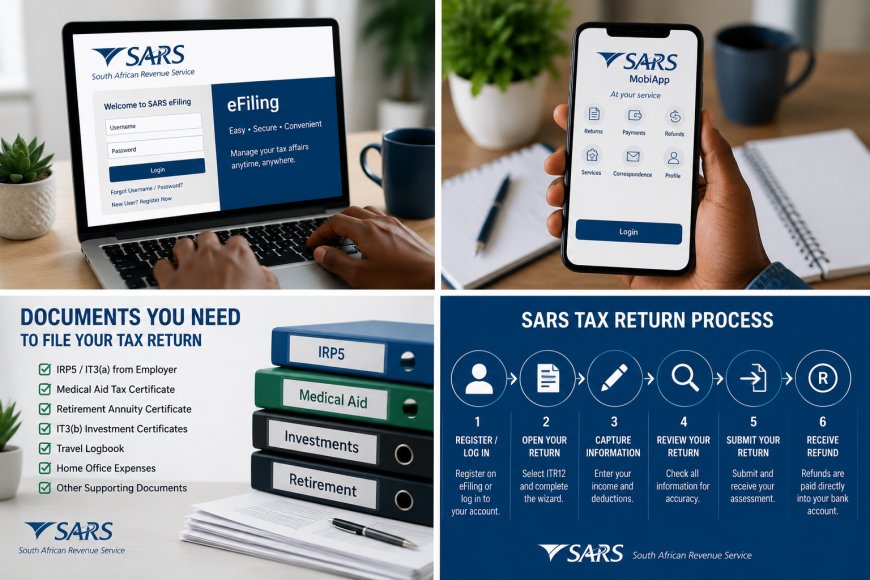
Before starting your tax return, gather the following documents where applicable:
- South African ID
- IRP5 or IT3(a) certificate from your employer
- Medical aid tax certificate
- Retirement annuity contribution certificates
- Investment income certificates (IT3(b))
- Rental income records
- Business income records
- Travel logbook (if claiming travel expenses)
- Home office expense records
- Banking details
Keep all supporting documents in case SARS requests verification.
How to Register for SARS eFiling
If you have never filed before:
- Visit the official SARS eFiling website.
- Register for an eFiling account.
- Verify your identity.
- Create your username and password.
- Activate your account.
You can also register using the SARS MobiApp.
Step-by-Step Guide to Filing Your SARS Return
Step 1: Log In
Sign in to SARS eFiling or the SARS MobiApp.
Step 2: Open Your Tax Return
Select:
Returns → Income Tax (ITR12)
If SARS has already prepared your return, review all the information carefully.
Step 3: Complete the Questionnaire
The return wizard will ask a few questions to determine which sections you need to complete.
Answer each question accurately.
Step 4: Review Your Income
Check that your:
- Salary
- PAYE deducted
- Interest earned
- Investment income
- Rental income
- Business income
have been captured correctly.
Step 5: Claim Eligible Deductions
Where applicable, include:
- Retirement annuity contributions
- Medical expenses
- Travel expenses
- Home office expenses
- Donations to approved organisations
Only claim deductions that you can support with valid documentation.
Step 6: Review Everything
Before submitting:
- Check your personal information.
- Confirm your banking details.
- Review all income and deductions.
- Correct any errors.
Step 7: Submit Your Return
Click Submit.
SARS will process your return and calculate whether:
- You qualify for a tax refund; or
- You need to pay additional tax.
SARS OFFICIAL WEBSITE: https://secure.sarsefiling.co.za/landing
What Happens After Submission?
After submitting:
- SARS may immediately issue an assessment.
- You may receive a refund if you overpaid tax.
- SARS may request supporting documents for verification.
- Once verification is complete, SARS will finalise your assessment.
Always monitor your eFiling profile and SMS notifications for updates.
Common Mistakes to Avoid
- Missing the filing deadline.
- Entering incorrect banking details.
- Claiming deductions without proof.
- Forgetting to review your Auto-Assessment.
- Ignoring SARS verification requests.
- Using outdated personal information.
Frequently Asked Questions
Can I file my SARS return on my phone?
Yes. You can submit your tax return using the SARS MobiApp.
Is SARS eFiling free?
Yes. SARS eFiling is completely free.
What happens if I miss the deadline?
Late submissions may result in administrative penalties and interest where applicable.
How long does SARS take to pay a refund?
Refunds vary depending on whether your return requires verification. Many taxpayers receive refunds within a few business days after a successful assessment, while verified returns may take longer.
Can I change my return after submitting it?
Yes. If SARS allows, you can request a correction through eFiling.
Related Posts You Must Not Skip
- SASSA GRANT PAYMENT DATES FOR JULY 2026
- ECD PROGRAMME CERTIFICATE 2026
- HOW TO FILL IN THE Z83 FOR CORRECTLY - STEP-BY-STEP GUIDE 2026
- HOW TO CHECK IF YOU ARE REGISTERED AS EMPLOYED OR UNEMPLYED IN SOUTH AFRICA
iYouth Tips
- File your tax return well before the closing date.
- Keep all tax documents for future reference.
- Double-check your banking details before submitting.
- Never share your SARS login credentials with anyone.
- Watch out for phishing emails pretending to be from SARS.
iYouth Disclaimer
iYouth shares educational and informational content to help South Africans understand government services and opportunities. We are not affiliated with the South African Revenue Service (SARS) and cannot submit tax returns or provide tax advice. Always use official SARS platforms for filing and account-related services.
What's Your Reaction?